Hey All,
Can anyone recommend a method for boosting the signal of a router for use with XBL? A friend of mine built a new house and the location from the man cave to the router seems to be an issue. We are gonna see if we can correct this tomorrow night.
Any feedback would be appreciated.
OT: Router Booster
Moderators: Bill_Abner, ScoopBrady
-
FifaInspected

- DSP-Funk All-Star

- Posts: 1799
- Joined: Mon Oct 17, 2005 3:00 am
OT: Router Booster
PSN - Fifa-Inspected
XBOX - Fifa Inspected
XBOX - Fifa Inspected

Re: OT: Router Booster
If your router is supported, custom router firmware like ddwrt allows you to boost the signal.
Or you can put on the foil!
http://lifehacker.com/296367/boost-your ... i-extender
Also I think you can buy relays or repeaters, but I don't know much about those options.
Or you can put on the foil!
http://lifehacker.com/296367/boost-your ... i-extender
Also I think you can buy relays or repeaters, but I don't know much about those options.
XBL-Naples39; Steam-scrub47; GameCenter-MasterOnion39;

Re: OT: Router Booster
I love you guys. I just reorganized my game room in the past couple of months, and apparently moving the router from the front wall of the back room to the back corner completely hosed my connection, as I lose XBL frequently from the front room XBoxes now, and can only intermittently get wireless out there.
What's more, I have the WRT54G, so that firmware boost should do the trick. Thanks to FIFA for making the thread, and Naples for the link
What's more, I have the WRT54G, so that firmware boost should do the trick. Thanks to FIFA for making the thread, and Naples for the link
-
Danimal

- DSP-Funk All-Star
- Posts: 12200
- Joined: Mon Apr 12, 2004 3:00 am
- Location: Chicago, Illinois
- Contact:
Re: OT: Router Booster
CAT 5 
All my gaming systems are hard wired to the router, I don't trust wireless when gaming is on the line. Work presentation sure, who gives a shot about that.
All my gaming systems are hard wired to the router, I don't trust wireless when gaming is on the line. Work presentation sure, who gives a shot about that.
Follow Me on:
YouTube - www.youtube.com/maxpixelation/
Twitch - twitch.tv/maximumpixelation
Twitter - twitter.com/maxpixelation
YouTube - www.youtube.com/maxpixelation/
Twitch - twitch.tv/maximumpixelation
Twitter - twitter.com/maxpixelation

Re: OT: Router Booster
I hear that. My 360 is wired. I had my pc wireless for a while but it was messing with my Warcraft so its wired again now too.Danimal wrote:
All my gaming systems are hard wired to the router, I don't trust wireless when gaming is on the line.
I let the PS3s go wireless but they mostly play blu rays and have not seen much of any online gaming so its all good. It started out that way by accident as I didnt need to buy an adaptor to get a PS3 wireless. Not that I would have.
All the wires are pretty ugly though.
-
pk500

- DSP-Funk All-Star
- Posts: 33907
- Joined: Sun Aug 11, 2002 3:00 am
- Location: Syracuse, N.Y.
- Contact:
Re: OT: Router Booster
Same here. I only race in iRacing on a hard-wired computer, and I only used hard wire when I was on Xbox Live back in the day.Danimal wrote:CAT 5
All my gaming systems are hard wired to the router, I don't trust wireless when gaming is on the line. Work presentation sure, who gives a shot about that.
"You know why I love boxers? I love them because they face fear. And they face it alone." - Nick Charles
"First on the throttle, last on the brakes." - @MotoGP Twitter signature
XBL Gamertag: pk4425
"First on the throttle, last on the brakes." - @MotoGP Twitter signature
XBL Gamertag: pk4425

Re: OT: Router Booster
Ideally, I'd love to be able to wire it all but it's not really possible with my setup. I have a dual band router and the 360 Slim gets a solid wireless N signal (100%). My PS3 gets a strong signal too but downloads on the PS Store are ridiculously slow. I actually thought of moving my modem and router to the living room so I could hard wire the 360 and PS3 but just haven't done it. Maybe some day.Danimal wrote:CAT 5
All my gaming systems are hard wired to the router, I don't trust wireless when gaming is on the line. Work presentation sure, who gives a shot about that.
XBLive Gamertag - Diablo25
PSN Name - EPDiablo25
PSN Name - EPDiablo25
-
dbdynsty25

- DSP-Funk All-Star
- Posts: 21625
- Joined: Mon Aug 19, 2002 3:00 am
- Location: Thousand Oaks, CA
Re: OT: Router Booster
The PS3 store is ALWAYS slow. I've got a 25mb FIOS connection and it creeps most of the time whereas the 360 flies. So don't use that as the measuring stick.
Re: OT: Router Booster
Yeah, that's what a many have told me. I tested the connection in the PS3 web browser and it was at like 12 MBPS.dbdynsty25 wrote:The PS3 store is ALWAYS slow. I've got a 25mb FIOS connection and it creeps most of the time whereas the 360 flies. So don't use that as the measuring stick.
XBLive Gamertag - Diablo25
PSN Name - EPDiablo25
PSN Name - EPDiablo25

Re: OT: Router Booster
I came across this article.
http://news.yahoo.com/blogs/upgrade-you ... 13350.html
Video:
http://news.yahoo.com/video/us-15749625/27210036
If you use a wifi network at home, there are undoubtedly limits to where you can access the signal. You might get a strong connection at the kitchen table, but take your laptop to the living room and you lose the signal. If you're looking to boost your signal a few feet or get a strong connection all the way upstairs in the back bedroom, we've got a handful of simple tricks and more advanced techniques to get you on connected to your home wifi from anywhere in your house.
Move your router:
* It's so simple, but many people don't realize that where you put your router really does make a difference. Obviously a central location is best, but for many, you are tied to putting the router where the Internet connection comes into the house.
* Beyond simple proximity, consider the router's height. The higher your router is on a shelf or cabinet, the less physical interference it's likely to encounter. Move the router to the best possible position to take advantage of doorways and open spaces instead of walls and corners. Wifi might move through the airwaves, but furniture, walls and appliances can weaken your signal substantially.
* Signal interference is one of the biggest culprits that might be at work if your wifi is weak. Walls and physical obstructions block your signal, but signals emitted by any electromagnetic household object do too. Scoot your router away from anything that might interfere: cordless phones, microwaves, wireless game controllers, other wifi-enabled devices (TVs, etc.), Bluetooth devices, and even flourescent lights and elevators.
Technical tweaks:
Once you've got your router in an ideal spot, take a look at your equipment. These next steps can help you further improve your wifi signal.
* Did you know routers have channels? If you live in close proximity to someone else with a wifi network you may both be trying to use the same channel and degrading your signals.
To find out if you are "crossing the streams" use WiFi Stumbler or inSSIDer to find the best and least-trafficked channel for your router to broadcast on. Once you've found the optimal channel, follow these step-by-step instructions to get your router on the right track.
* Depending on the age of your router, it may be slower than newer models. Upgrade an older b or g router to an n router to extend your range for relatively reasonable cost. There are some new n routers for as little as $30. An n router can handle local electrical and physical signal interference better than b and g and may get you quite a bit more range.
* Lesser-known fact: The "current standard" 802.11n routers can operate at either 2.4 GHz or 5 GHz bands, and 2.4 GHz is far better at travelling through walls. So if you already have a Wireless-n router and need it to extend farther, make sure it's set to use 2.4 GHz instead of 5 GHz.
* The internal antenna on your laptop itself can be a factor in how much range you get. Even if your laptop has built-in wifi, it could be well worth picking up an external USB adapter, like this $30 option from Netgear.
This could also help an older laptop without Wireless-N support take advantage of faster speeds and improved range from a new 802.11n router.
Invest in network extension options:
* Wifi repeaters amplify and extend your wireless signal. Put a repeater within range of your existing wifi router and it will relay that signal out to hard-to-reach locations around your home or office. They cost about $90 and while they can theoretically double your range, real life results tend to vary considerably. If you've had good or bad luck with a repeater, we welcome any advice or testimonials in the comments section below.
* Powerline networking uses the electrical wiring in your house to extend your Internet coverage. This is especially good if you want to get Internet access in a back room or you want to connect a gaming console that's on an old TV in the garage. Plug one powerline adapter into your router and the other into an electrical plug. Then in the far room where you want connectivity, plug the other powerline adapter into an electrical plug and voila - you've got Internet, you can even put a second wireless router on that connection. Setting up an alternative powerline network using your home's own AC power adapters can circumvent many of the most common wireless connectivity problems, and you don't even need to give up wifi altogether. If you look into getting started with a powerline setup, be sure to stick with one manufac
http://news.yahoo.com/blogs/upgrade-you ... 13350.html
Video:
http://news.yahoo.com/video/us-15749625/27210036
If you use a wifi network at home, there are undoubtedly limits to where you can access the signal. You might get a strong connection at the kitchen table, but take your laptop to the living room and you lose the signal. If you're looking to boost your signal a few feet or get a strong connection all the way upstairs in the back bedroom, we've got a handful of simple tricks and more advanced techniques to get you on connected to your home wifi from anywhere in your house.
Move your router:
* It's so simple, but many people don't realize that where you put your router really does make a difference. Obviously a central location is best, but for many, you are tied to putting the router where the Internet connection comes into the house.
* Beyond simple proximity, consider the router's height. The higher your router is on a shelf or cabinet, the less physical interference it's likely to encounter. Move the router to the best possible position to take advantage of doorways and open spaces instead of walls and corners. Wifi might move through the airwaves, but furniture, walls and appliances can weaken your signal substantially.
* Signal interference is one of the biggest culprits that might be at work if your wifi is weak. Walls and physical obstructions block your signal, but signals emitted by any electromagnetic household object do too. Scoot your router away from anything that might interfere: cordless phones, microwaves, wireless game controllers, other wifi-enabled devices (TVs, etc.), Bluetooth devices, and even flourescent lights and elevators.
Technical tweaks:
Once you've got your router in an ideal spot, take a look at your equipment. These next steps can help you further improve your wifi signal.
* Did you know routers have channels? If you live in close proximity to someone else with a wifi network you may both be trying to use the same channel and degrading your signals.
To find out if you are "crossing the streams" use WiFi Stumbler or inSSIDer to find the best and least-trafficked channel for your router to broadcast on. Once you've found the optimal channel, follow these step-by-step instructions to get your router on the right track.
* Depending on the age of your router, it may be slower than newer models. Upgrade an older b or g router to an n router to extend your range for relatively reasonable cost. There are some new n routers for as little as $30. An n router can handle local electrical and physical signal interference better than b and g and may get you quite a bit more range.
* Lesser-known fact: The "current standard" 802.11n routers can operate at either 2.4 GHz or 5 GHz bands, and 2.4 GHz is far better at travelling through walls. So if you already have a Wireless-n router and need it to extend farther, make sure it's set to use 2.4 GHz instead of 5 GHz.
* The internal antenna on your laptop itself can be a factor in how much range you get. Even if your laptop has built-in wifi, it could be well worth picking up an external USB adapter, like this $30 option from Netgear.
This could also help an older laptop without Wireless-N support take advantage of faster speeds and improved range from a new 802.11n router.
Invest in network extension options:
* Wifi repeaters amplify and extend your wireless signal. Put a repeater within range of your existing wifi router and it will relay that signal out to hard-to-reach locations around your home or office. They cost about $90 and while they can theoretically double your range, real life results tend to vary considerably. If you've had good or bad luck with a repeater, we welcome any advice or testimonials in the comments section below.
* Powerline networking uses the electrical wiring in your house to extend your Internet coverage. This is especially good if you want to get Internet access in a back room or you want to connect a gaming console that's on an old TV in the garage. Plug one powerline adapter into your router and the other into an electrical plug. Then in the far room where you want connectivity, plug the other powerline adapter into an electrical plug and voila - you've got Internet, you can even put a second wireless router on that connection. Setting up an alternative powerline network using your home's own AC power adapters can circumvent many of the most common wireless connectivity problems, and you don't even need to give up wifi altogether. If you look into getting started with a powerline setup, be sure to stick with one manufac

Re: OT: Router Booster
XBL Gamertag: RobVarak
"Ok I'm an elitist, but I have a healthy respect for people who don't measure up." --Aaron Sorkin
"Ok I'm an elitist, but I have a healthy respect for people who don't measure up." --Aaron Sorkin
-
dbdynsty25
- DSP-Funk All-Star
- Posts: 21625
- Joined: Mon Aug 19, 2002 3:00 am
- Location: Thousand Oaks, CA
Re: OT: Router Booster
These have been around for around a year now. These are just Netgear's version. As mentioned in the comments, the Asus AC66U is essentially the same thing and I've been using it for 9 months without issue. It's ridiculously good.RobVarak wrote:New routers looking fairly promising:
http://www.polygon.com/2013/10/1/478957 ... -nighthawk
http://www.asus.com/Networking/RTAC66U/
Re: OT: Router Booster
Yep, got one of those myself about 8 months ago. Sadly, my house is so old that signals don't get through the lead pipes and horrible paint I'm sure they have there, not to mention the bathrooms are smack-dab in the middle of my house. It's almost like an island through the center if you viewed floor plans. So no matter where it's positioned, it's got to go through a bunch of plumbing, and it sucks.
What I resorted to is grabbing a couple of switches, and running a hellatiously long cable through the walls and out to the switches in the front and back rooms. Then wiring everything around those switches. I still use the wireless signal for tablets and phones, but all of my PC's and Consoles are hard wired through this crazy network of cables I've laid out.
What I resorted to is grabbing a couple of switches, and running a hellatiously long cable through the walls and out to the switches in the front and back rooms. Then wiring everything around those switches. I still use the wireless signal for tablets and phones, but all of my PC's and Consoles are hard wired through this crazy network of cables I've laid out.
Re: OT: Router Booster
Just a quick heads up...I just got an email from Amazon that this router is a Daily Deal today. $173.61...down from $199.99. Prime eligible.dbdynsty25 wrote:These have been around for around a year now. These are just Netgear's version. As mentioned in the comments, the Asus AC66U is essentially the same thing and I've been using it for 9 months without issue. It's ridiculously good.RobVarak wrote:New routers looking fairly promising:
http://www.polygon.com/2013/10/1/478957 ... -nighthawk
http://www.asus.com/Networking/RTAC66U/
XBLive Gamertag - Diablo25
PSN Name - EPDiablo25
PSN Name - EPDiablo25

Re: OT: Router Booster
Advice requested: right now I have one Ethernet cable running from my router to behind my TV to pick up my SlkngBox which doesn't have wifi. I'd like to experiment with hard wiring my Xbone and other gaming devices via Ethernet instead of relying on the wifi, but I don't want to run any more cables from the TV area to where the router is.
Can I use some sort of Ethernet hub or switch to put all the devices together onto the single Ethernet cable now running to the router? What would be the right piece of gear to do this correctly?
At this stage I'm not really able to move the router to behind the TV area and then keep the single Ethernet cable for the run to the modem, so I need some other option that can get all these devices to the router via the single Ethernet cable if possible.
Can I use some sort of Ethernet hub or switch to put all the devices together onto the single Ethernet cable now running to the router? What would be the right piece of gear to do this correctly?
At this stage I'm not really able to move the router to behind the TV area and then keep the single Ethernet cable for the run to the modem, so I need some other option that can get all these devices to the router via the single Ethernet cable if possible.
Re: OT: Router Booster
XBL Gamertag: RobVarak
"Ok I'm an elitist, but I have a healthy respect for people who don't measure up." --Aaron Sorkin
"Ok I'm an elitist, but I have a healthy respect for people who don't measure up." --Aaron Sorkin

Re: OT: Router Booster
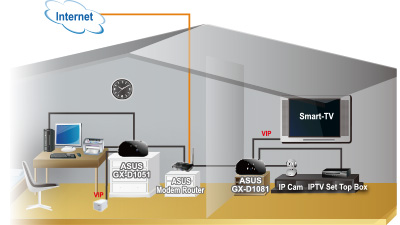
I'm looking into the same thing and a switch would be the right place to go. Something like http://www.amazon.com/V3-Embedded-Effic ... B00CMNYXME should suffice, but I haven't bought it yet.Zeppo wrote:Advice requested: right now I have one Ethernet cable running from my router to behind my TV to pick up my SlkngBox which doesn't have wifi. I'd like to experiment with hard wiring my Xbone and other gaming devices via Ethernet instead of relying on the wifi, but I don't want to run any more cables from the TV area to where the router is.
Can I use some sort of Ethernet hub or switch to put all the devices together onto the single Ethernet cable now running to the router? What would be the right piece of gear to do this correctly?
At this stage I'm not really able to move the router to behind the TV area and then keep the single Ethernet cable for the run to the modem, so I need some other option that can get all these devices to the router via the single Ethernet cable if possible.
Here is Asus' ad diagram showing it sitting exactly where you describe:
-
dbdynsty25
- DSP-Funk All-Star
- Posts: 21625
- Joined: Mon Aug 19, 2002 3:00 am
- Location: Thousand Oaks, CA
Re: OT: Router Booster
Word of advice...if you can skip using a switch, if at all possible, DO IT. When devices share essentially the same IP from the router/access point, you're bound to run into dropped packets/random disconnects/etc. It just happens. And if online gaming is important, please whatever you do, have the Xbox/PS4/whatever on it's own dedicated line. Network connection issues all over the place from my experience (with other friends, not myself, I'm smarter than that, haha).
Re: OT: Router Booster
Yeah, this is what I'm trying to avoid and wasn't sure if a switch would solve the problem. I guess not. So what other option is there to maintain one single Ethernet cable run to the TV besides moving the router itself to behind the TV? I'm under the impression there's no good way to have two separate routers on the same network, correct? Could I add a second router if I were to configure them somehow to not get in each other's way? Any solutions you can think of, DB, other than running separate cables for each device?dbdynsty25 wrote: When devices share essentially the same IP from the router/access point, you're bound to run into dropped packets/random disconnects/etc.
Right now, I have my wireless router set up in bridge mode and the modem's internal router doing the DHCP (have had nothing but trouble trying to turn off or bypass the router functions of the modem to say the least) and that wireless router is connected to the modem/router via a single Ethernet cable, so I'm not clear on how this is different than a switch would be behind the TV.
-
dbdynsty25
- DSP-Funk All-Star
- Posts: 21625
- Joined: Mon Aug 19, 2002 3:00 am
- Location: Thousand Oaks, CA
Re: OT: Router Booster
In this case, if moving your router behind your TV isn't ideal, then stick with Wireless. As long as the AP is close, you should be fine. Much better than using a hub/switch. Assuming you don't have a desktop PC that requires the hard wire, then move your router behind the TV. Is it safe to assume you have cable internet...and if so, it shouldn't be that big of a deal. That's exactly what I did in my office...moved the router in there behind my TV (I have FIOS tho, but same coax connection) and then I can hard wire my DirecTV receiver, my desktop, PS4 and OUYA right to it. I run the Xbox One and my Chromecast over wireless from our main room. It's pretty much the best solution I could come up with without actually running ethernet through the walls. Maybe when I move someday.
Re: OT: Router Booster
I have DSL - what verizon calls "enhanced DSL" - and it gives me plenty good speeds for what I need (upwards of 13-14 Mbps down through the wifi). I use your hated Airport base station to provide my wifi network, and I've never had any problems with it whatsoever in bridge mode.
I just don't have room to move the modem and airport behind the TV right now.
And I'm still not clear on how a switch would be different that what I'm doing with my airport being a bridge and connected to the router via Ethernet cable. According to the router, each device has it's own internal IP address - why wouldn't the asus Ethernet switch listed above be able to do the same thing?
It makes me nervous how they advertise a "priority" port. Seems to jibe with what your saying.
I just don't have room to move the modem and airport behind the TV right now.
And I'm still not clear on how a switch would be different that what I'm doing with my airport being a bridge and connected to the router via Ethernet cable. According to the router, each device has it's own internal IP address - why wouldn't the asus Ethernet switch listed above be able to do the same thing?
It makes me nervous how they advertise a "priority" port. Seems to jibe with what your saying.
-
dbdynsty25
- DSP-Funk All-Star
- Posts: 21625
- Joined: Mon Aug 19, 2002 3:00 am
- Location: Thousand Oaks, CA
Re: OT: Router Booster
Simply:
When you have a DSL modem (which has an IP address EXTERNALLY from your house) to an Airport...the Airport goes and assigns INTERNAL IP addresses to all of your devices and then routes (hence the name router) data to said devices. When you take one of those INTERNAL IP addresses and put multiple devices on it, the Airport has no control over which device gets which data. In this case it would be the Switch doing that distribution. But...and here's the big issue with it...now you're introducing three devices between your connection to the outside world and your end device (Xbox/PS4/Whatever)...the more devices, the more chances there are to lose data. The switch is the least reliable device on the network and that essentially is the most important. Bad idea.
When you have a DSL modem (which has an IP address EXTERNALLY from your house) to an Airport...the Airport goes and assigns INTERNAL IP addresses to all of your devices and then routes (hence the name router) data to said devices. When you take one of those INTERNAL IP addresses and put multiple devices on it, the Airport has no control over which device gets which data. In this case it would be the Switch doing that distribution. But...and here's the big issue with it...now you're introducing three devices between your connection to the outside world and your end device (Xbox/PS4/Whatever)...the more devices, the more chances there are to lose data. The switch is the least reliable device on the network and that essentially is the most important. Bad idea.
Re: OT: Router Booster
Well I'm not using my airport to deal with DHCP, the modem device has a router built in and that router is handling all DHCP and routing. The airport is purely in bridge mode and only creating a wifi network, not distributing any ip addresses. All wifi devices connected show individual ip addresses in the router.
I wonder if your friends had an Ethernet hub and not an Ethernet switch. There seems to be a significant difference in operational abilities between a hub and a switch, and as far as I can tell with my relatively limited network knowledge, a hub would do exactly what you describe (share one ip among devices, send all packets to all devices), whereas it seems a switch can look at packets and direct traffic to specific devices connected to it.
I wish I knew more about networking!
I wonder if your friends had an Ethernet hub and not an Ethernet switch. There seems to be a significant difference in operational abilities between a hub and a switch, and as far as I can tell with my relatively limited network knowledge, a hub would do exactly what you describe (share one ip among devices, send all packets to all devices), whereas it seems a switch can look at packets and direct traffic to specific devices connected to it.
I wish I knew more about networking!
-
dbdynsty25
- DSP-Funk All-Star
- Posts: 21625
- Joined: Mon Aug 19, 2002 3:00 am
- Location: Thousand Oaks, CA
Re: OT: Router Booster
Well technically yes, a switch is much more advanced than a hub by essentially assigning it's own IP addresses to devices. I just hate introducing more "routing" devices in a network. Hey...go crazy...get a switch. If it works, awesome! I mean, theoretically, it should...but I've had issues with them in the past which is why I express concern in a configuration like that.
Re: OT: Router Booster
Personally, my network has 2 switches with 13 wired devices connected, and a dozen more wireless devices and I do not have packet loss or anything that degrades the connection.